Bestandteil folgender docs:
Online-Links:
Zugehörig zu:
englisch
health problems associated with computers
- aching hands, shoulders, back or head
- RSI
- repatitive strain injury
- slow and tired eyes
prevention
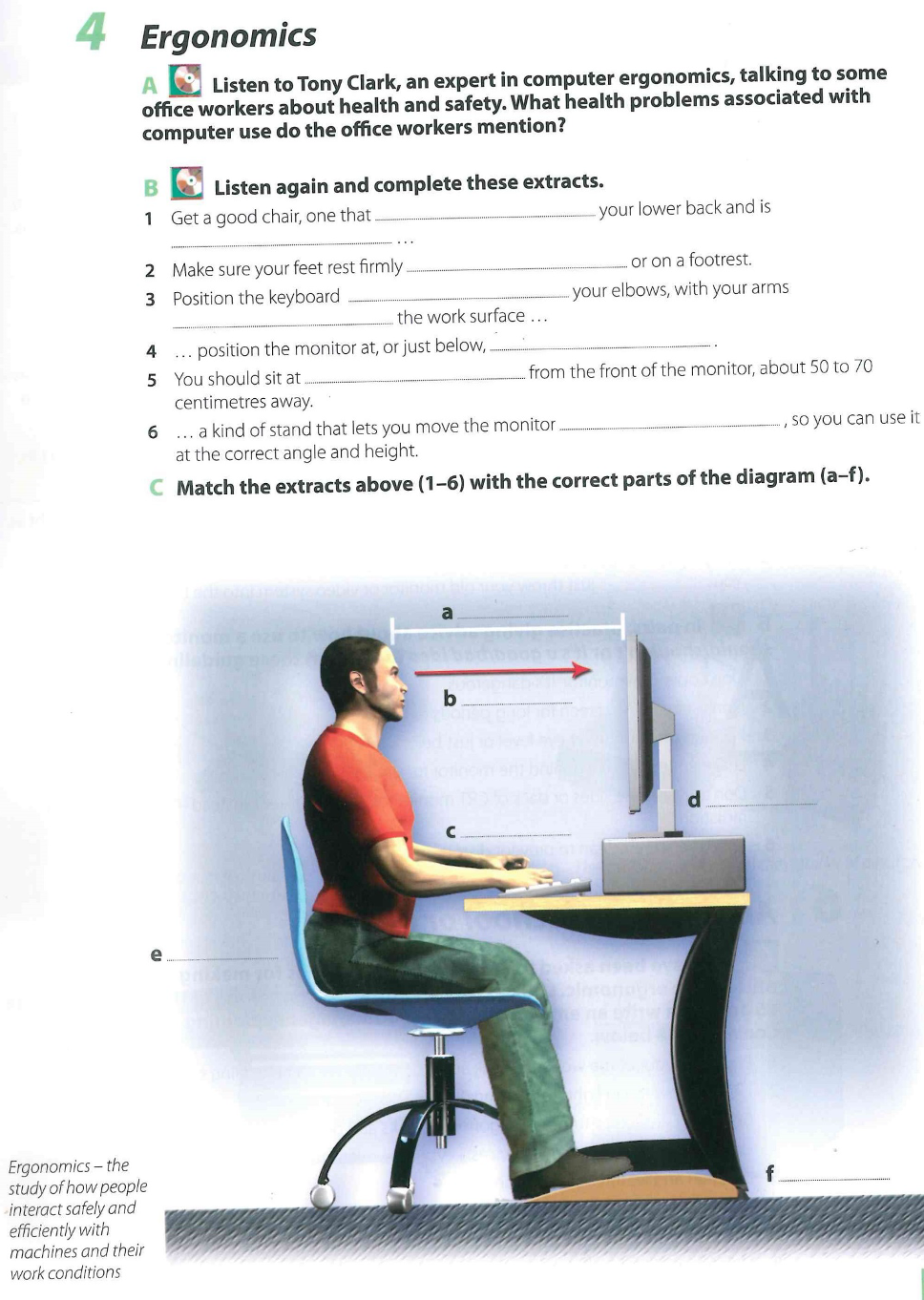
- chair that supports your lower back and is adjustable (e)
- feets should rest on the floor or a footrest (f)
- keyboard at same height like your elbows & arms parallel to the work surface (c)
- monitor at or just below eye level (b)
- arms length distance to monitor, about 50-70cm (a)
- monitor stand that lets the monitor turn around or up and down (d)
Checklist for a healthy workspace
| Question | Yes | No |
|---|---|---|
| Do your chair have a shape that supports your spinal curves? | x | |
| Do your chair is adjustable in height? | x | |
| Can your feet touch the ground? | x | |
| Can your elbows be flexed in a 90 degree angle or less to the desk? | x | |
| Is your monitor on eye level? | x | |
| Is your monitor about an arms length away from you? | x | |
| Is there enough space under the desk for your legs? | x | |
| Can you adjust the tables height? | x | |
| Do you have a wrist rest? | x | |
| Is your mouse on the same surface as your keyboard? | x | |
| Is your mouse within easy reach? | x | |
| Can you adjust the sensitivity of the mouse that a light touch is enough to operate? | x | |
| Do you have a headset you can use? | x |
Letter to my boss
Dear Mr. X,
I was asked by the company to give you advices for better handling with the employee ergonomics. So I did some questioning and worked out two points but first of all I want to tell you that we already have a good handling over all. We have adjustable and supportive chairs. Tables that have many space. Good monitors who are adjustable to eye level. And very comfortable headsets.
My first point on the list is a simple and cost-effective thing, wrist rests. After long time typing the employees notice pains in the wrists because of the hard edges of the tables.
Secondly I want to notice that we have just two options. Either have the blinds open and get blinded by the sun or have the blindes closed and turn on the lights. As a solution we would love to get plissees. Then we can adjust them where the sun is and dont need to lower the blindes completely.
Thanks for you attention.
Sincerely Tim
Worksheet
Part 1: Vocabulary Match
Match the words with their correct definitions.
| Word | Definition |
|---|---|
| 1. Posture | a) A support for your feet |
| 2. Monitor | b) The way you sit or stand |
| 3. Footrest | c) A short interruption from work |
| 4. Glare | d) The computer screen |
| 5. Break | e) Bright light that makes it hard to see |
Your answers: 1 → b 2 → d 3 → a 4 → e 5 → c
Part 2: Ergonomic Tips – Fill in the blanks
Complete the sentences:
- Sit straight with your back supported.
- The top of your monitor should be at eye-level.
- Avoid screen glare/reflexion by adjusting lighting.
- Keep your keyboard and mouse close to your body.
- Take breaks and stretch your body regularly.
Part 3: Reflection
Answer the question in 2–3 sentences: Why is ergonomics important for IT professionals?
Ergonomics are important for IT professionals because they are sitting in front of the monitor the whole day and wrong ergonomics could ruin their backs, eyes, etc. very strong.
Part 4: Short Answer
Answer the question in 2–3 sentences: What can happen if you ignore ergonomic principles at your desk?
You can get back problems, eye problems or anything else.